
Settings - Shipping & Handling
The Shipping & Handling Settings allows you to configure shipping methods, shipping class, shipment calculator, shipping rates, shipping profiles, shipping zones, and delivery options. These settings help ensure a seamless shipping process for customers by defining costs, available shipping regions, and calculation methods. This document provides guidelines on how to configure, manage, and troubleshoot shipping settings.
Accessing Shipping Settings
- Login to your WebCommander account.
- Navigate to Settings from the left sidebar.
- Click on Shipping & Handling to access the settings.
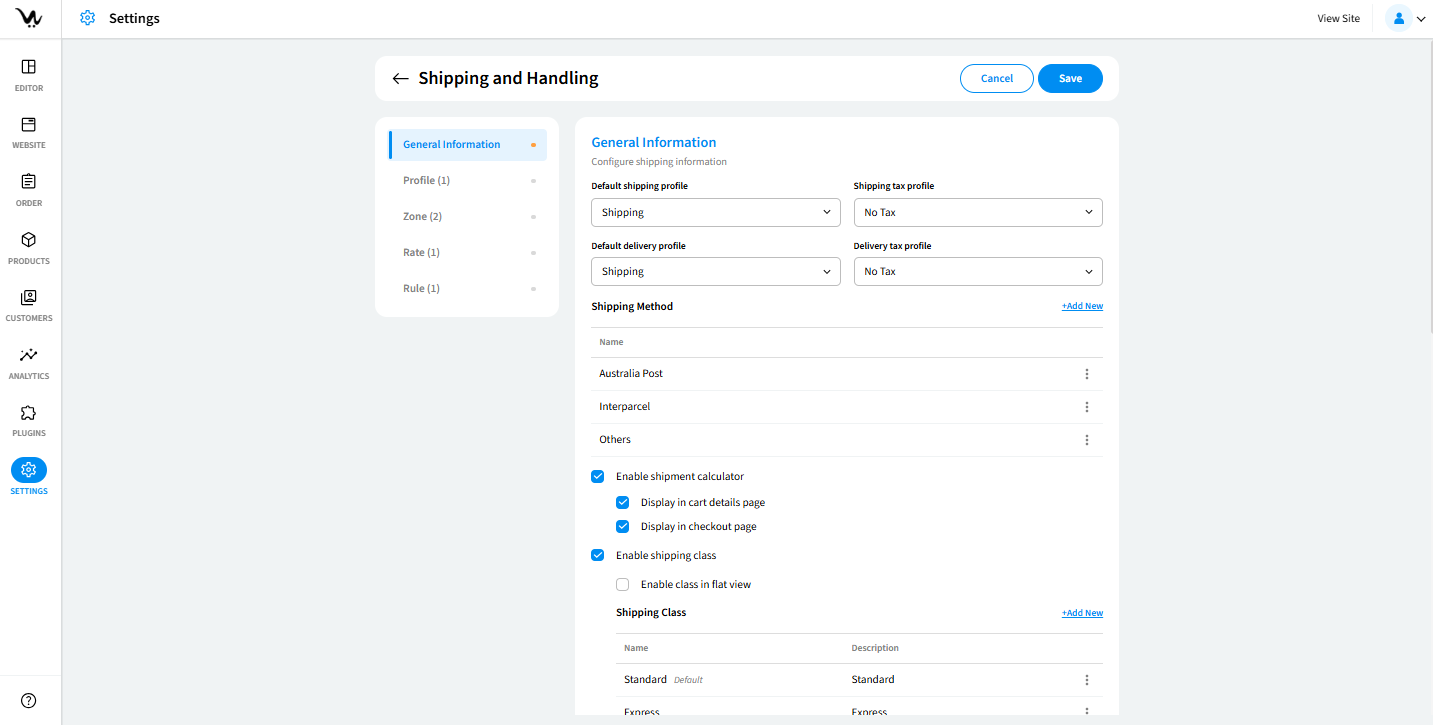
General Information
Default Shipping Profiles
Allows selection of a default shipping profile from a pre-created list.
- Result:
- The selected shipping profile is applied to all eligible products.
Shipping Tax Profile
Enables selection of a tax profile for shipping costs.
- Result:
- Ensures shipping tax is applied correctly according to tax rules.
Default Delivery Profile
Sets a default shipping profile for product deliveries.
- Result:
- Standardizes delivery methods across the store.
Delivery Tax Profile
Allows selection of a tax profile for delivery charges.
- Result:
- Ensures tax is applied to delivery fees based on predefined tax profiles.
Shipping Methods
Manage Shipping Methods
Displays available shipping methods in a table format. Has options to edit, remove, or set a method as default.
- Result:
- Allows easy management of shipping methods.
Add New Shipping Method
Allows store owners to create custom shipping methods.
- Validation:
- Method name must be alphanumeric.
- Result:
- Enables customisation of shipping methods.
Enable Shipment Calculator
Allows customers to calculate shipping costs before checkout. It can be displayed on the cart page or checkout page.
- Result:
- Provides cost transparency before purchase.
Shipping Class Management
Enable Shipping Class
Enables classification of shipping methods into categories.
- Result:
- Helps apply different rates based on shipping class.
Manage Shipping Classes
Displays a list of shipping classes. Options to edit, set as default, or remove classes.
- Result:
- Provides structured shipping options for products.
Add New Shipping Class
Allows the addition of a new shipping class.
- Validation:
- Name must be alphanumeric.
- Result:
- Enables categorisation of shipping options.
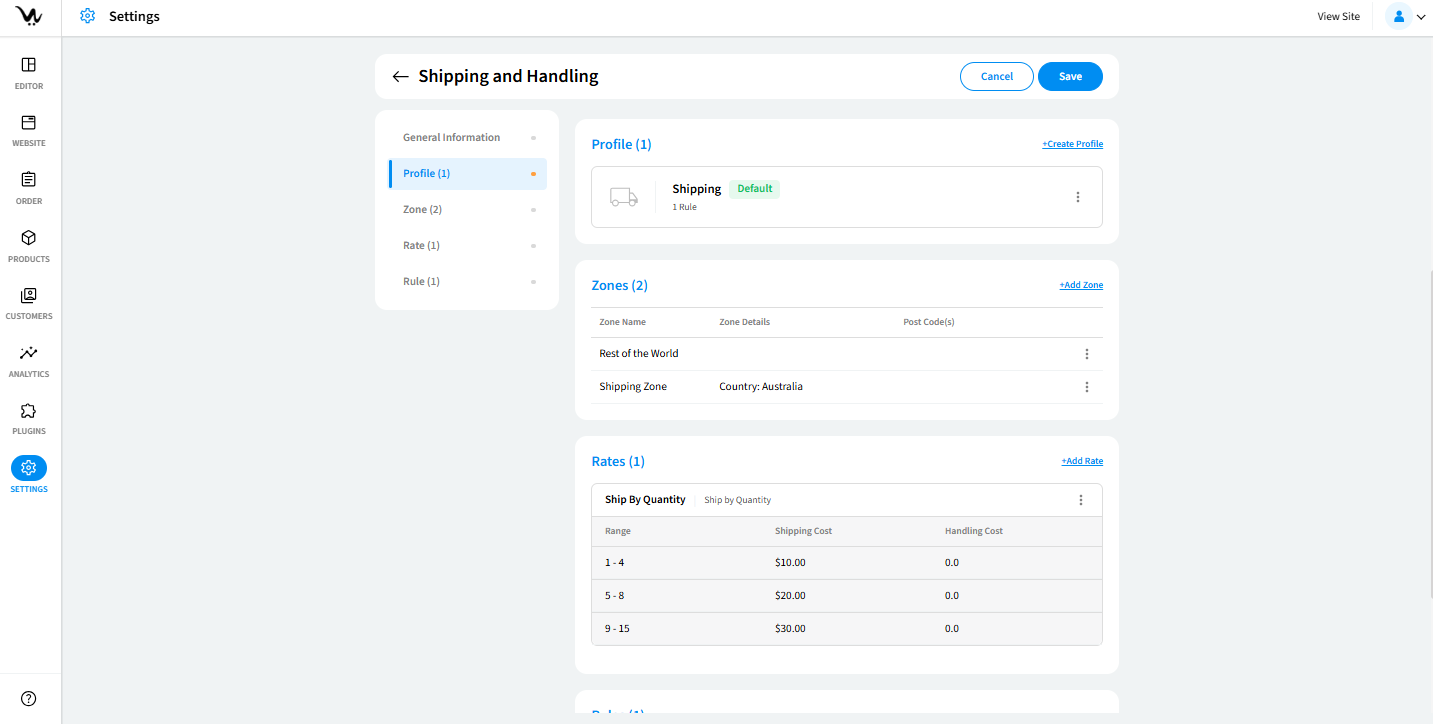
Shipping Profiles
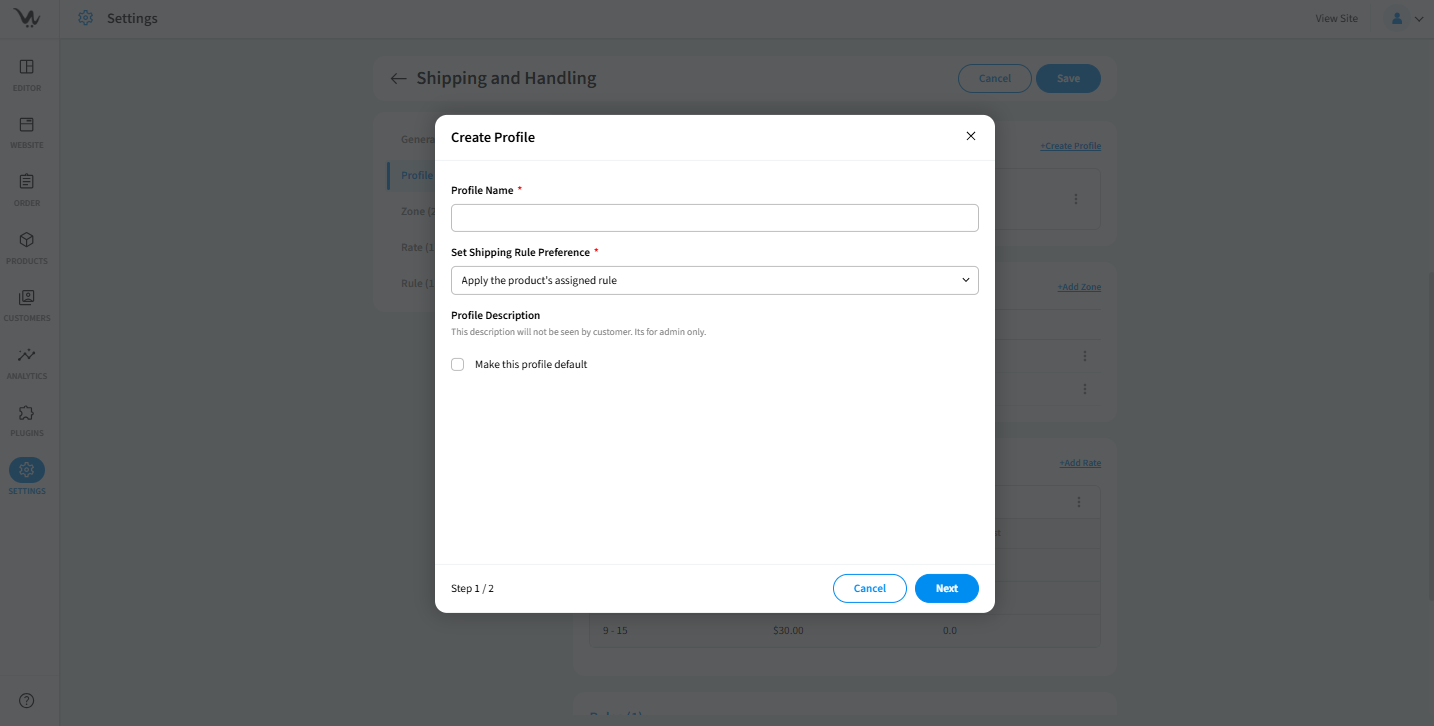
Create a Shipping Profile
Allows the creation of shipping profiles for different products or services.
- Validation:
- Profile name must be alphanumeric and required.
- Result:
- Customises shipping rules for different product categories.
Set Shipping Rule Precedence
Defines how shipping rules are applied.
- Options:
- Apply the product’s assigned rule
- Apply the lowest shipping cost rule
- Apply the highest shipping cost rule
- Result:
- Determines how shipping rates are calculated.
Set Default Shipping Profile
Allows setting a profile as default.
- Result:
- Ensures that a preferred shipping profile is automatically applied.
Shipping Zones
-1.png)
-1.png)
Manage Shipping Zones
Displays a list of shipping zones and details. Allows store owners to edit, remove, or create new zones.
- Result:
- Ensures that shipping is available only in selected regions.
Add New Shipping Zone
Allows creation of a new shipping zone.
- Validation:
- Zone name must be alphanumeric.
- Result:
- Helps define regions where shipping is available.
Use Radius for Shipping Zones
Enables setting a delivery radius for shipping zones.
- Result:
- Restricts delivery to a specific geographic area.
Set Country and State for Zones
Allows selection of a country and state for each zone.
- Result:
- Defines geographic regions for shipping.
Shipping Rates
.png)
Add New Shipping Rate
Allows creation of shipping rate codes.
- Validation:
- Rate name must be alphanumeric.
- Result:
- Helps store owners apply predefined shipping rates.
Manage Shipping Rates
Options to edit, remove, or update shipping rates.
- Result:
- Ensures that shipping costs remain accurate.
Shipping Cost Calculation Methods
- Options:
- Flat Rate – Charges a fixed shipping cost.
- Ship by Price – Calculates shipping based on product price range.
- Ship by Quantity – Calculates shipping based on product quantity.
- Ship by Weight – Calculates shipping based on product weight.
- Ship by Variation – Applies different rates for product variations.
- Result:
- Offers flexible shipping cost calculations.
Troubleshooting Guide – Shipping Settings
- Ensure the shipping method is enabled and assigned to a valid profile.
- Verify and update the shipping tax profile in settings.
- Ensure the rate name follows validation rules and re-enter the details.
- Ensure the shipment calculator is enabled and assigned to the cart or checkout page.
- Check that zones are correctly mapped to shipping rules.
